Accessing devices plugged to Serial Device Server
Serial Port Redirector can be used to access remote serial devices connected to serial device servers.
In this example, Modem US Robotics is physically attached to the COM port on the remote Serial Device Server. You need to get access to the modem from your local computer over local network or the Internet. To get access to the remote modem, Serial Port Redirector creates virtual COM port on the local computer (e.g. COM3).
When virtual serial port is created it is required to specify the IP-address of the Serial Device Server and TCP port of a particular COM port. An individual TCP port is assigned to a separate physical COM port on a Serial Device Server. In the example the US Robotics modem is plugged into the COM port with TCP port 5001 on the Serial Device Server.
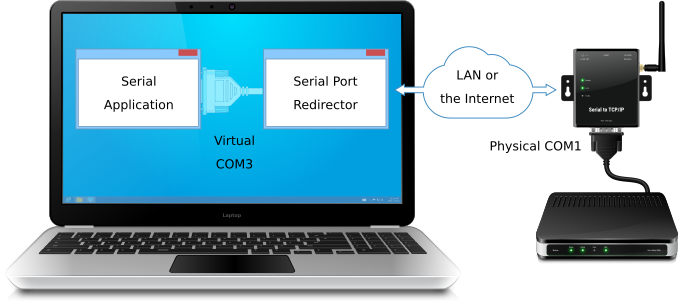
Now, modem software on the local computer opens virtual COM3 port. As result the connection with the remote modem is established and data exchange can be performed. The modem software interacts with the modem as if it were plugged into a local COM port, but in fact the modem is attached to the remote Serial Device Server.
Usually, RFC2217 protocol (Telnet Com Port Control Option) is used to access serial devices attached to serial device server.
Connecting serial communications application with TCP/IP-enabled application
Serial Port Redirector can be used to connect usual serial communications software with TCP/IP software.
In this example, the TCP/IP application is running on the remote computer and listens on the specified TCP port for incoming connections.
The serial communications application is running on the local computer and uses virtual serial port COM3 created by Serial Port Redirector. This virtual serial port is configured to use the remote IP address and TCP port which the TCP/IP application listens on.
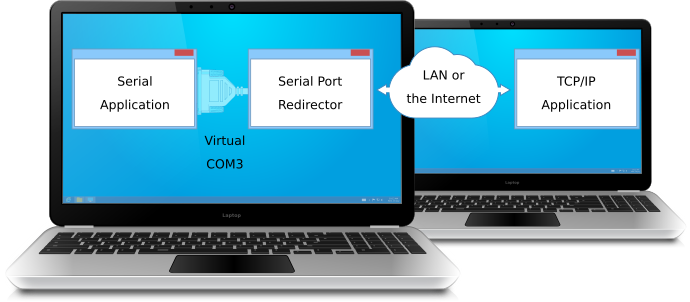
When the serial communications application opens COM3, Serial Port Redirector initiates connection to specified TCP port of the remote computer. Remote TCP/IP application accepts the incoming connection and now serial communications application exchanges data with the TCP/IP application over a local network or the Internet.
Usually, Raw data protocol is used to connect serial communications application with TCP/IP application.
Using Serial Port Redirector as a Serial Device Server
Serial Port Redirector allows to convert usual PC into Serial Device Server, so any serial devices plugged to local COM ports become available remotely.
In this example, Serial Port Redirector is installed on the remote PC where serial device is plugged. Server physical port COM1 is configured in Serial Device Redirector for accepting incoming network connections on specified TCP port.
Also, Serial Port Redirector is installed on the local PC. Serial communications application, which also runs on the local PC, uses virtual serial port COM3 created by Serial Port Redirector. This virtual serial port is configured to use the remote IP address and TCP port of the remote computer.
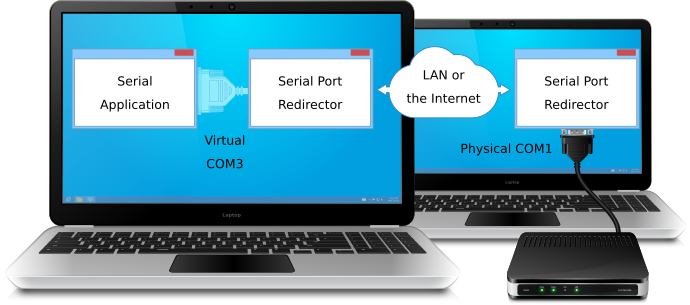
Now, the application on the local computer opens virtual COM port. As result the connection with the remote serial device is established.
Usually, RFC2217 protocol (Telnet Com Port Control Option) is used to access serial devices attached to serial device server.