Configuring Server Virtual Port
Select virtual serial port and click the
 button.
Bitrate Emulation
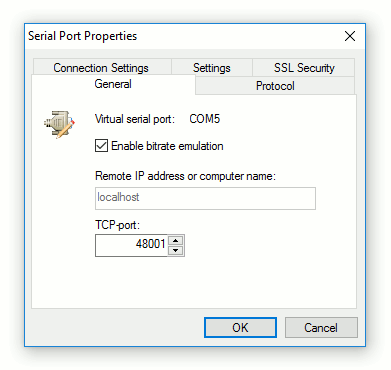
By enabling bitrate emulation, you limit data transmission speed to the limit specified by communications application (using Baud Rate setting). If bitrate emulation is disabled, transmission speed depends on bandwidth of the network connection.
Protocol
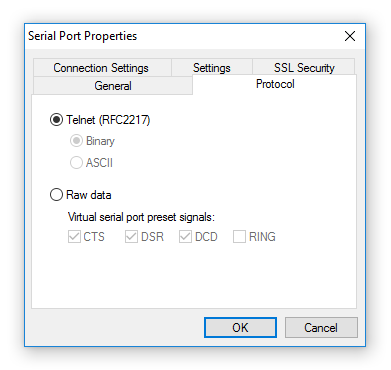
Serial Port Redirector uses Telnet protocol (with the COM Port Control protocol specified by RFC 2217) and Raw data protocol (raw TCP connection) to transfer data.
- Binary
- Allows to send any binary data.
- ASCII
- Uses NVT-compatible mode
Note: You can Configure serial port control signals for Raw data protocol. Selected signals will be preset for selected serial port.
Connection Settings
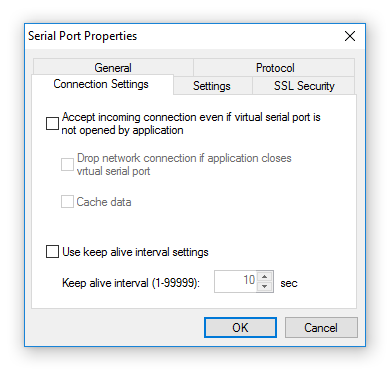
- Accept incoming connection even if virtual serial port is not opened by application
- By default the program doesn't accept network connections if the virtual port isn't opened by any application. If the option is checked the program will accept incoming network connections even if the port isn't opened by any application.
- Drop network connection if application closes virtual serial port
- If an application closes virtual serial port, Serial Port Redirector drops network connection with the remote side.
- Cache data
- This option allows caching the data from the network in case if the port isn't opened by any application. Until the virtual serial port is opened by an application, all data coming from the network is being cached. As soon as the program opens this port, cached data will be transmitted to virtual port.
- Use keep alive interval settings
- If enabled, a keep-alive message is sent to server port to prevent client-server link from being broken (necessary for some hardware serial-to-ethernet devices).
- Keep alive interval
- Interval (in seconds) between two keep-alive messages.
Fixed Port Settings
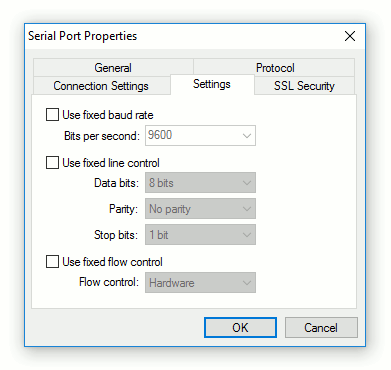
There are some communications applications that open COM ports with "hard-coded" port settings (e.g. bits per second or flow control) and there is no standard way to change these settings. If a serial device uses other settings, this may lead to incorrect working of the whole system. In such case you can use fixed COM port settings to override settings used by communications application.
SSL Security
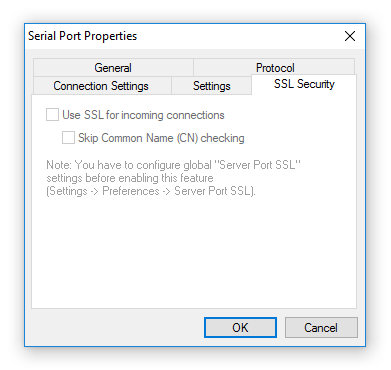
- Use SSL for connection to remote side
- enables/disables SSL for incoming connections for the serial port. It will use global SSL settings from Server Port SSL preferences.